
ຂ້ອຍສ້າງ OrderBridge ແນວໃດ: ການແກ້ໄຂ ການເຊື່ອມຕໍ່ Delivery ກັບ POS
ເມື່ອບໍ່ເທົ່າໃດເດືອນກ່ອນ, ລູກຄ້າຄົນໜຶ່ງມາຫາຂ້ອຍດ້ວຍບັນຫາທີ່ເບິ່ງຄືວ່າງ່າຍ ແລະ ກົງໄປກົງມາ. ເຂົາເຈົ້າຕ້ອງການເຊື່ອມຕໍ່ຊ່ອງຫວ່າງລະຫວ່າງແພລດຟອມ Delivery ຫຼັກໆ ກັບລະບົບ POS ຂອງເຂົາເຈົ້າເອງ ດ້ວຍການເຮັດ OAuth 2.0 ແບບອັດຕະໂນມັດ.
ໂຄງການນີ້ເລີ່ມຕົ້ນຈາກຄວາມຕ້ອງການຕົວຈິງຂອງລູກຄ້າ. ຄໍາຮ້ອງຂໍມາເປັນພາສາສະເປນ: “Queremos conectar los servicios de domicilios de nuestros clientes (DoorDash, etc.) a StreamOrder utilizando OAuth. Una vez que StreamOrder esté conectado y autenticado, las cuentas de los servicios de entrega de los clientes se conectarán a nuestro sistema POS.” ສະຫຼຸບສັ້ນໆ: ເຂົາເຈົ້າຕ້ອງການເຊື່ອມຕໍ່ບັນຊີ Delivery ຂອງລູກຄ້າເຂົ້າກັບລະບົບ POS ຜ່ານ Partner API ຂອງ StreamOrder - ໂດຍອັດຕະໂນມັດຜ່ານ OAuth, ບໍ່ຕ້ອງມີການຈັດການດ້ວຍມື. ຂ້ອຍໄດ້ວິເຄາະຄວາມຕ້ອງການ, ອ່ານເອກະສານຂອງ StreamOrder, ແລະ ເລີ່ມເຮັດວຽກ.
ຂໍ້ສະເໜີຂອງລູກຄ້າ
ກ່ອນຈະຂຽນໂຄ້ດແມ້ແຕ່ແຖວດຽວ, ຂ້ອຍໄດ້ລວບລວມຂໍ້ສະເໜີທີ່ເປັນທາງການ. ມັນຊ່ວຍສ້າງຄວາມຊັດເຈນໃຫ້ທັງສອງຝ່າຍ - ລູກຄ້າເຂົ້າໃຈວ່າເຂົາເຈົ້າຈະໄດ້ຫຍັງ, ແລະ ຂ້ອຍກໍເຂົ້າໃຈວ່າຂ້ອຍພວມສ້າງຫຍັງ.
ຂໍ້ສະເໜີໂຄງການ
ການເຊື່ອມຕໍ່ Delivery Apps ກັບ POS
Middleware API · StreamOrder · OAuth 2.0
Maximiliano B. Torres
February 27, 2026
ຄໍາອະທິບາຍ
ໂຄງການນີ້ສ້າງ "ຂົວຕໍ່ດິຈິຕອນ" ທີ່ມີຄວາມປອດໄພ ແລະ ເປັນອັດຕະໂນມັດ - ເປັນ Middleware API ລະຫວ່າງຕົວລວມອໍເດີ (StreamOrder aggregator) ແລະ ລະບົບ POS ຂອງລູກຄ້າ, ເຮັດໃຫ້ອໍເດີຈາກ Delivery ໄຫຼເຂົ້າສູ່ POS ໂດຍອັດຕະໂນມັດ ໂດຍບໍ່ຕ້ອງມີການປ້ອນຂໍ້ມູນດ້ວຍມື.
ວັດຖຸປະສົງ
ຕິດຕັ້ງ OAuth 2.0 ເປັນຊັ້ນການກວດສອບສິດ (Authentication layer), ເພື່ອຮັບປະກັນຄວາມປອດໄພຂອງຂໍ້ມູນ ໃນຂະນະທີ່ອະນຸຍາດໃຫ້ອໍເດີຊິງຄ໌ຈາກແພລດຟອມ Delivery ເຂົ້າສູ່ POS ໂດຍອັດຕະໂນມັດ.
ຂະບວນການໂຄງສ້າງ
ໄລຍະເວລາ 4 ອາທິດ
ອາທິດທີ 1
ຄວາມປອດໄພ ແລະ ການເຊື່ອມຕໍ່ດິຈິຕອນ
ເປົ້າໝາຍ: ເຊື່ອມຕໍ່ບັນຊີລູກຄ້າຢ່າງປອດໄພ.
ຜົນຮັບ: StreamOrder ຖືກເຊື່ອມຕໍ່ຢ່າງເປັນທາງການ; ຂໍ້ມູນຖືກປ້ອງກັນດ້ວຍຄີ OAuth ທີ່ເຂົ້າລະຫັດໄວ້.
ອາທິດທີ 2
ຂົວຕໍ່ອັດຕະໂນມັດ
ເປົ້າໝາຍ: ເຮັດໃຫ້ລະບົບສື່ສານກັນໄດ້.
ຜົນຮັບ: ລະບົບແປງຂໍ້ມູນ (Translator) ແລະ Webhook listener ເປີດໃຊ້ໃນສະພາບແວດລ້ອມທົດສອບ - ອໍເດີຖືກຈັບ ແລະ ແປງຂໍ້ມູນໄດ້ທັນທີ.
ອາທິດທີ 3
Dashboard ແລະ ການເປີດໃຊ້ງານຈິງ
ເປົ້າໝາຍ: ຄວາມພ້ອມໃນການສະແດງຜົນ ແລະ ການໃຊ້ງານຈິງ.
ຜົນຮັບ: ລະບົບເຮັດວຽກແລ້ວ, ອໍເດີຖືກພິມອອກໃນ POS, Dashboard ຕິດຕາມການເຮັດວຽກຖືກສົ່ງມອບ.
ອາທິດທີ 4
ການປັບແຕ່ງ ແລະ ການຕິດຕາມ
ເປົ້າໝາຍ: ຄວາມໝັ້ນຄົງພາຍໃຕ້ສະພາບການໃຊ້ງານຈິງ.
ຜົນຮັບ: ຕິດຕາມການເຮັດວຽກ 7 ວັນ; ຫາກມີການປ່ຽນແປງ API ຈາກ StreamOrder ຫຼື Delivery ຈະຖືກແກ້ໄຂທັນທີ.
ສິ່ງທີ່ຈະສົ່ງມອບ
ເງື່ອນໄຂເບື້ອງຕົ້ນຂອງໂຄງການ
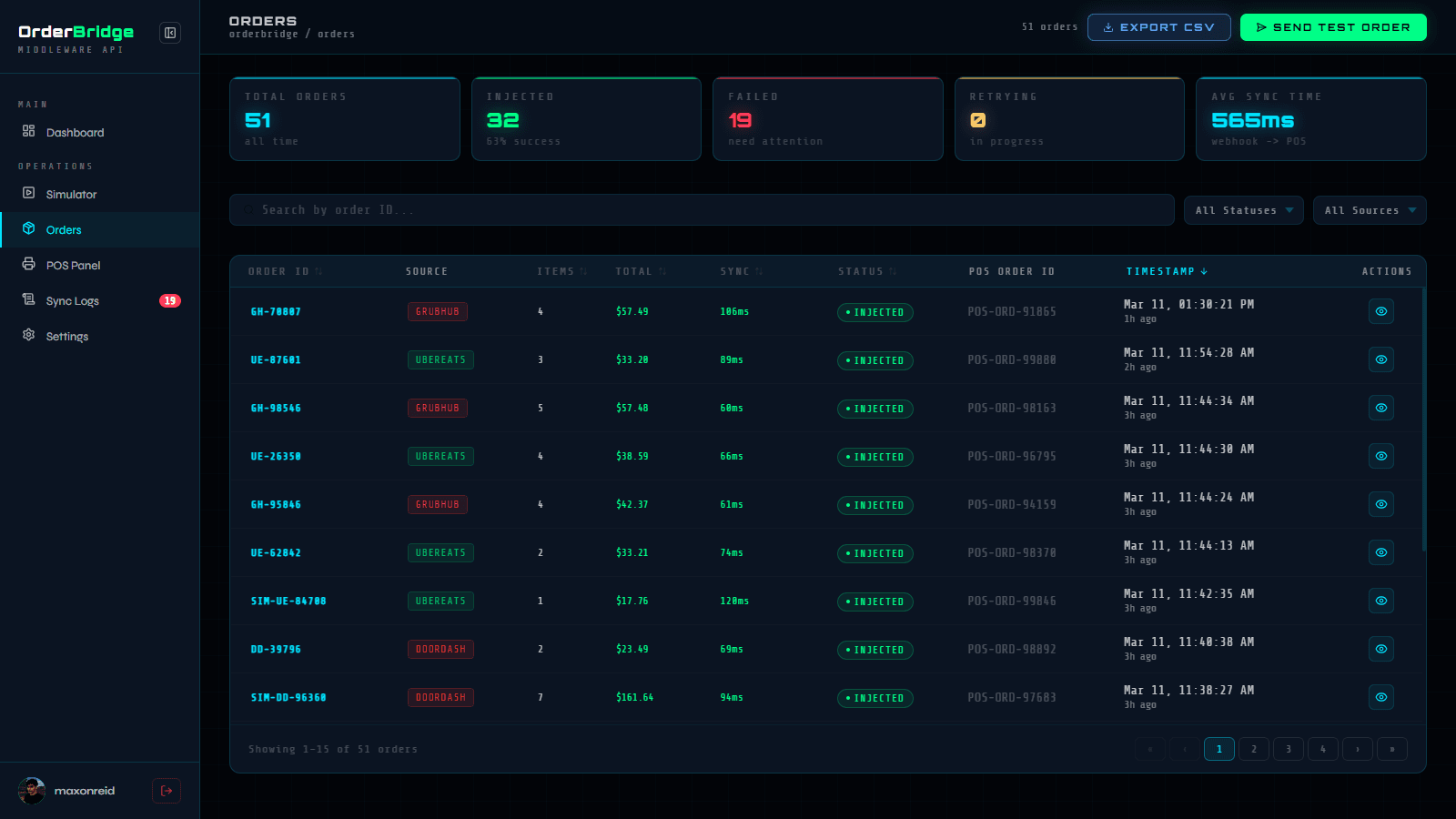
ການຕິດຕາມອໍເດີທັງໝົດ
ກ່ອນທີ່ພວກເຮົາຈະເຮັດໃຫ້ມັນເປັນອັດຕະໂນມັດ, ຂະບວນການເຮັດວຽກແມ່ນໜ້າເບື່ອ ແລະ ຫຍຸ້ງຍາກ. ເຮືອນຄົວທີ່ຫຍຸ້ງຫຼາຍສ່ວນໃຫຍ່ຈະມີແທັບເລັດເຕັມໄປໝົດຈາກແອັບ Delivery ຕ່າງໆ.
ພະນັກງານຕ້ອງ:
- ອ່ານອໍເດີຈາກແທັບເລັດ.
- ພິມມັນເຂົ້າໄປໃນ POS ດ້ວຍມື.
- ຫວັງວ່າເຂົາເຈົ້າຈະບໍ່ພາດໝາຍເຫດເຊັ່ນ "ບໍ່ໃສ່ຫົວບົ່ວ" ຫຼື ຢ່າງອື່ນ.
ໃນຮ້ານທີ່ງຽບໆ ມັນອາດຈະເບິ່ງຄືບໍ່ມີຫຍັງ. ແຕ່ໃນເຮືອນຄົວທີ່ເຮັດ 80+ ອໍເດີຕໍ່ມື້, ມັນເປັນບັນຫາໃຫຍ່ໃນການດໍາເນີນງານ.
ການຄິດໄລ່
ການອອກແບບລະບົບ
ເມື່ອເຫັນ ROI ທີ່ຊັດເຈນແລ້ວ, ຂ້ອຍໄດ້ວາງແຜນລະບົບ. ຕັກກະ (Logic) ຕ້ອງແໜ້ນແຟ້ນ:
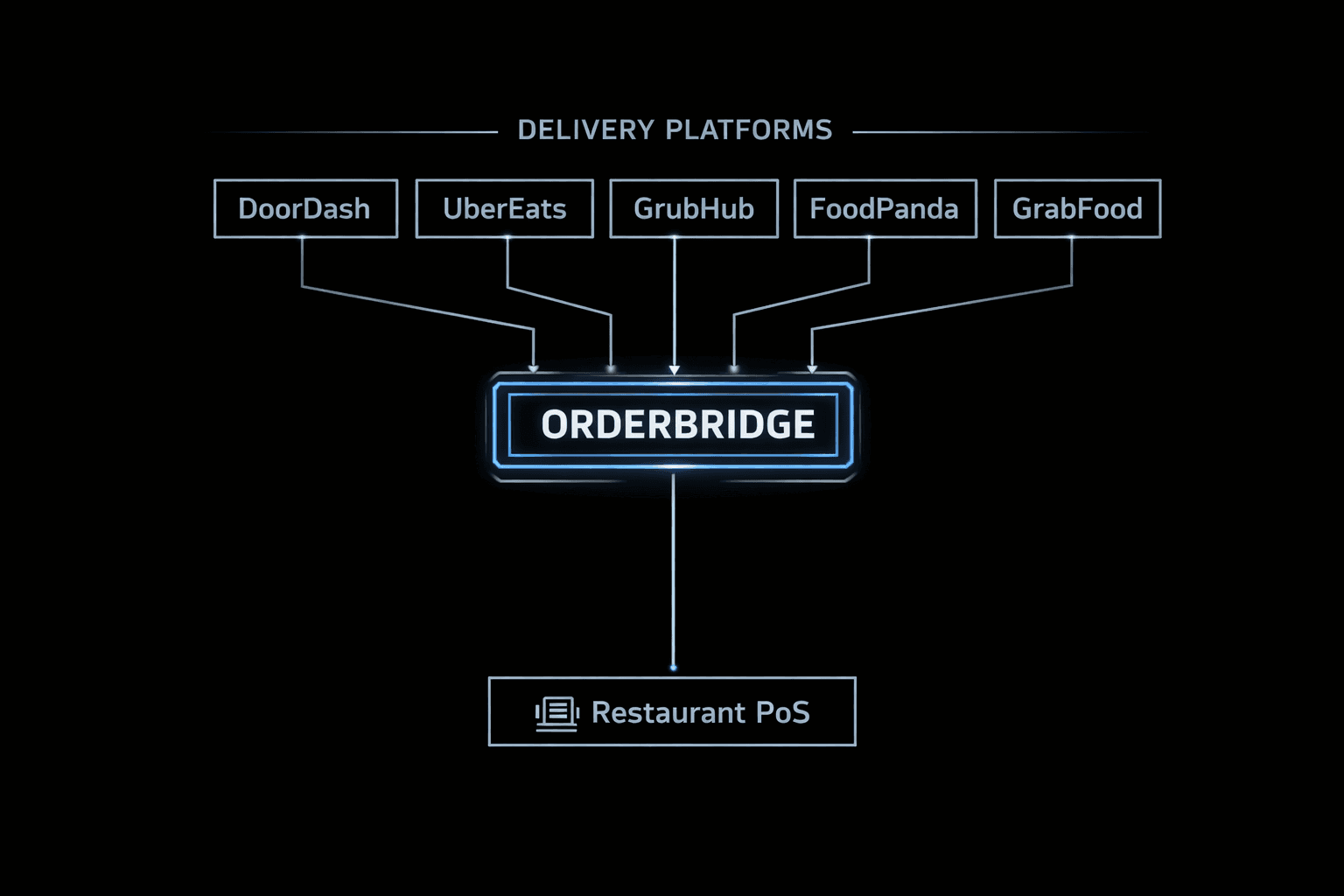
ຮັບ Webhooks ຈາກ Delivery
ຮັບ HTTPS POST ຈາກແຕ່ລະແພລດຟອມ.
ກວດສອບລາຍເຊັນ (Signature)
ກວດສອບ HMAC-SHA256 - ເນັ້ນຄວາມປອດໄພເປັນອັນດັບທໍາອິດ.
ແປງ Schema ຂໍ້ມູນ
ແປງຂໍ້ມູນ JSON ທີ່ແຕກຕ່າງກັນໃຫ້ເປັນຮູບແບບດຽວກັນສໍາລັບ POS.
ປ້ອນອໍເດີເຂົ້າລະບົບ
POST ຫາ POS API ພ້ອມລະບົບລອງໃໝ່ (exponential-backoff retry).
ແຈ້ງເຕືອນການອັບເດດ
ສົ່ງຂໍ້ມູນຜ່ານ WebSocket ຫາ Dashboard - ບໍ່ຕ້ອງລໍຖ້າການໂຫລດໜ້າເວັບ.
ການຂຽນ Spec ກ່ອນ
ຂ້ອຍເລີ່ມຕົ້ນດ້ວຍ Software Requirements Specification (SRS) ກ່ອນທີ່ຈະຂຽນໂຄ້ດແມ້ແຕ່ແຖວດຽວ. ມັນງ່າຍກວ່າຫຼາຍທີ່ຈະແກ້ໄຂຂໍ້ຜິດພາດໃນເອກະສານກ່ວາການຂຽນໂຄ້ດໃໝ່ໃນພາຍຫຼັງ. SRS ບັງຄັບໃຫ້ຂ້ອຍ ແລະ ລູກຄ້າເຫັນດີນໍາກັນວ່າຄໍາວ່າ "ສໍາເລັດ" ແມ່ນຫຍັງ - ບໍ່ມີຄວາມຄຸມເຄືອ, ບໍ່ມີວຽກທີ່ງອກອອກມາເກີນຂອບເຂດ.
ລະບົບຕ້ອງເຮັດໜ້າທີ່ເປັນ OAuth 2.0 provider - ອອກ, ກວດສອບ ແລະ Refresh token ຕາມ RFC 6749.
ລະບົບຕ້ອງຮັບ HTTPS POST webhooks ຈາກແພລດຟອມ Delivery ແລະ ກວດສອບແຕ່ລະ request ດ້ວຍ HMAC-SHA256.
ລະບົບຕ້ອງແປງຂໍ້ມູນຈາກທຸກແພລດຟອມໃຫ້ເປັນຮູບແບບ POS ດຽວກັນ, ພ້ອມລະບົບແຈ້ງເຕືອນຫາກບໍ່ພົບ SKU.
ລະບົບຕ້ອງ POST ອໍເດີທີ່ແປງແລ້ວຫາ POS API ພ້ອມລະບົບ Retry ຫາກພົບຂໍ້ຜິດພາດ - ຈະບໍ່ມີອໍເດີໃດຫາຍໄປໂດຍບໍ່ແຈ້ງເຕືອນ.
Dashboard ຕ້ອງສະແດງສະຖານະອໍເດີຜ່ານ WebSocket. ບໍ່ມີການ Polling.
OAuth tokens ຕ້ອງບໍ່ຫາຍໄປເມື່ອ Server Restart ແລະ ຖືກເກັບຮັກສາແບບເຂົ້າລະຫັດ (encrypted at rest).
Tech Stack ທີ່ໃຊ້
ເຄື່ອງມືທີ່ຂ້ອຍໃຊ້ສໍາລັບໂຄງການປະເພດນີ້:
ຂ້ອຍໝັ້ນໃຈວ່າ Python ກໍເຮັດວຽກໄດ້ດີໃນສ່ວນນີ້. ແຕ່ສ່ວນຕົວຂ້ອຍມັກການເຮັດວຽກກັບ Node modules ແລະ npm ຫຼາຍກວ່າ pip ແລະ virtual environments.
Express ເປັນມາດຕະຖານເກົ່າ, ແຕ່ Fastify ຖືກສ້າງມາເພື່ອປະສິດທິພາບທີ່ທັນສະໄໝ. ມີລະບົບກວດສອບ JSON schema ໃນຕົວ, ໃຊ້ຊັບພະຍາກອນໜ້ອຍ. ສໍາລັບ Middleware API ທີ່ທຸກໆມິນລິວິນາທີມີຄ່າ, Fastify ແມ່ນຜູ້ຊະນະ.
ໂຄງສ້າງພື້ນຖານ
ທັງສາມບໍລິການຖືກຕິດຕັ້ງແຍກກັນ - ແຕ່ລະອັນມີ Host ຂອງຕົນເອງ, Domain ຂອງຕົນເອງ ແລະ ໜ້າທີ່ຂອງຕົນເອງ. ນີ້ແມ່ນການຈໍາລອງໂຄງສ້າງຂອງການເຊື່ອມຕໍ່ລະບົບໃນລະດັບການໃຊ້ງານຈິງ.
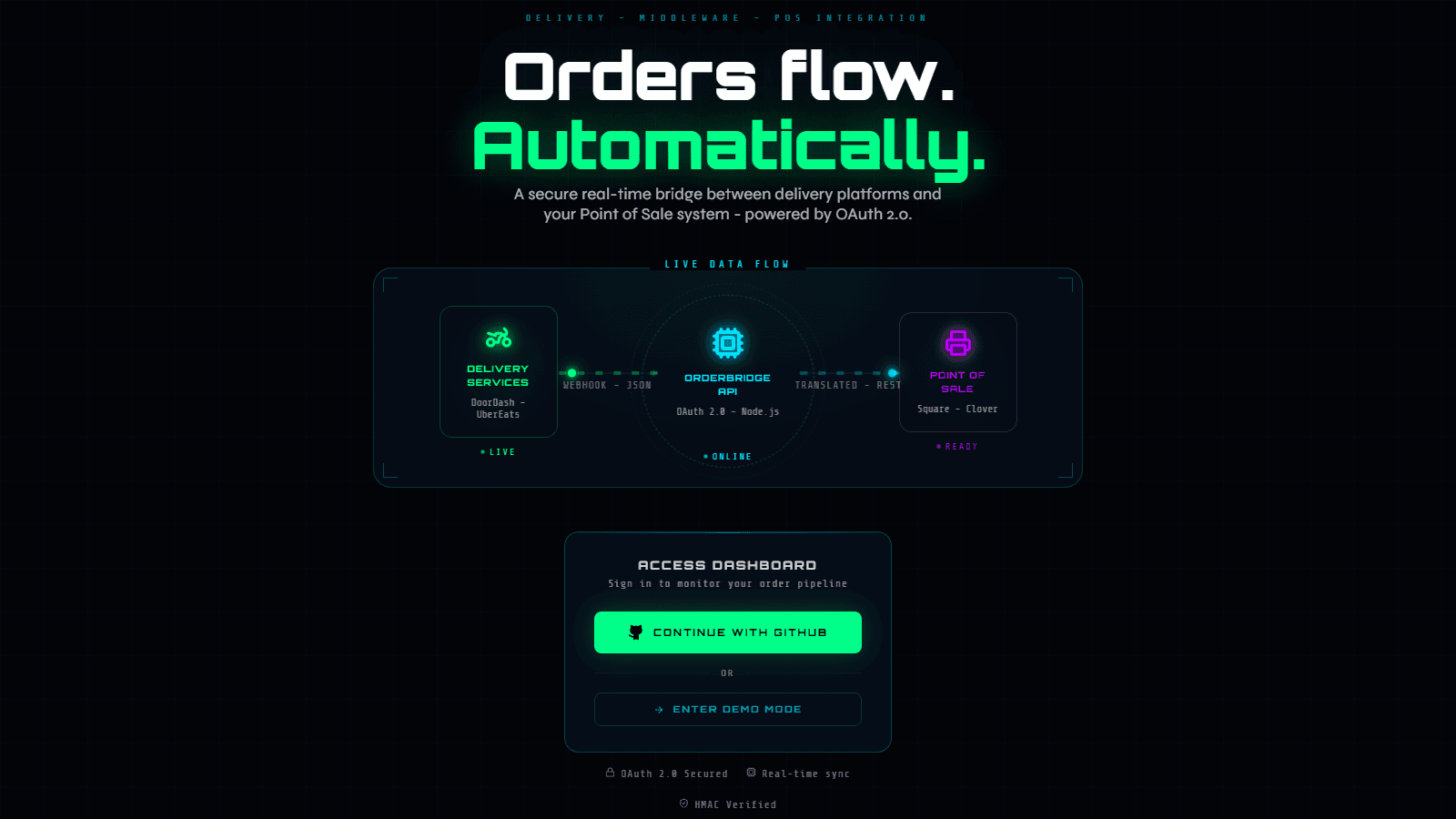
ພາບລວມໂຄງສ້າງ
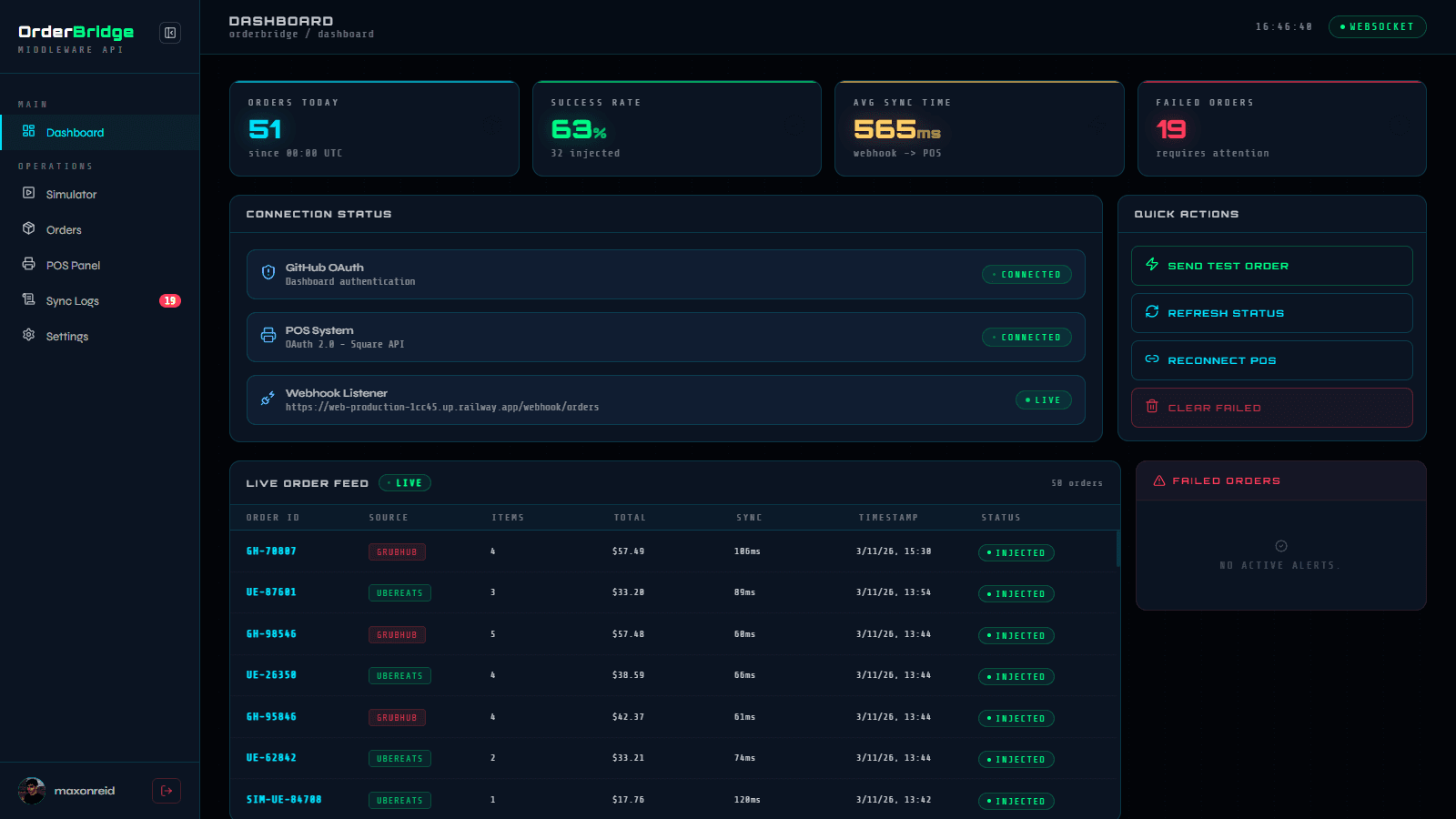
UI ສໍາລັບຕິດຕາມແບບ Real-time - ຕິດຕັ້ງແບບ Edge, ເຂົ້າເຖິງໄດ້ໄວທົ່ວໂລກ.
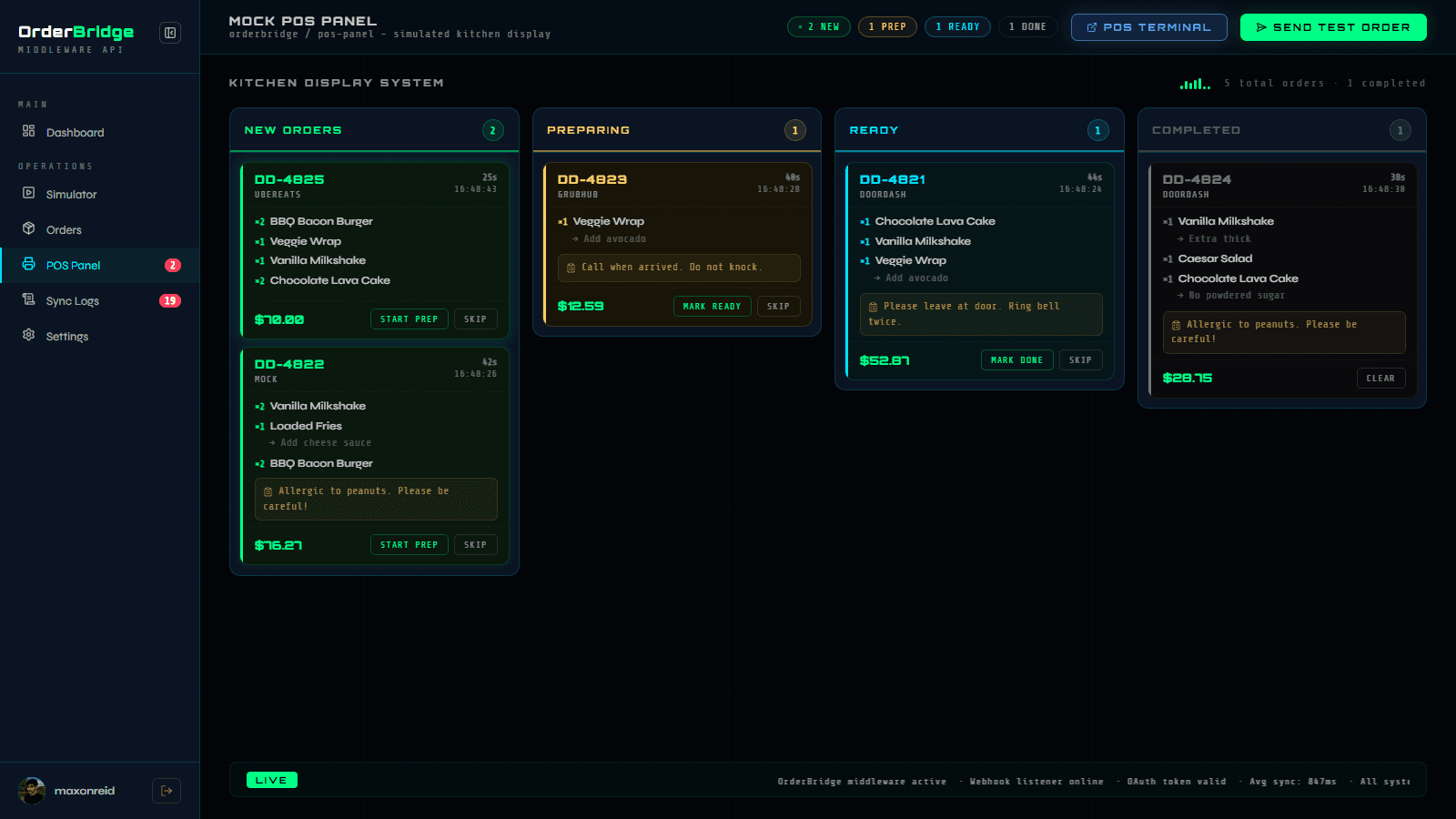
ຫົວໃຈຫຼັກຂອງລະບົບ Middleware ພ້ອມ OAuth server, ລະບົບຮັບ Webhook, ແປງຂໍ້ມູນ ແລະ ປ້ອນຂໍ້ມູນ POS. PostgreSQL ເກັບຮັກສາ OAuth tokens, ຂໍ້ມູນການຈັບຄູ່ເມນູ ແລະ ບັນທຶກອໍເດີ.
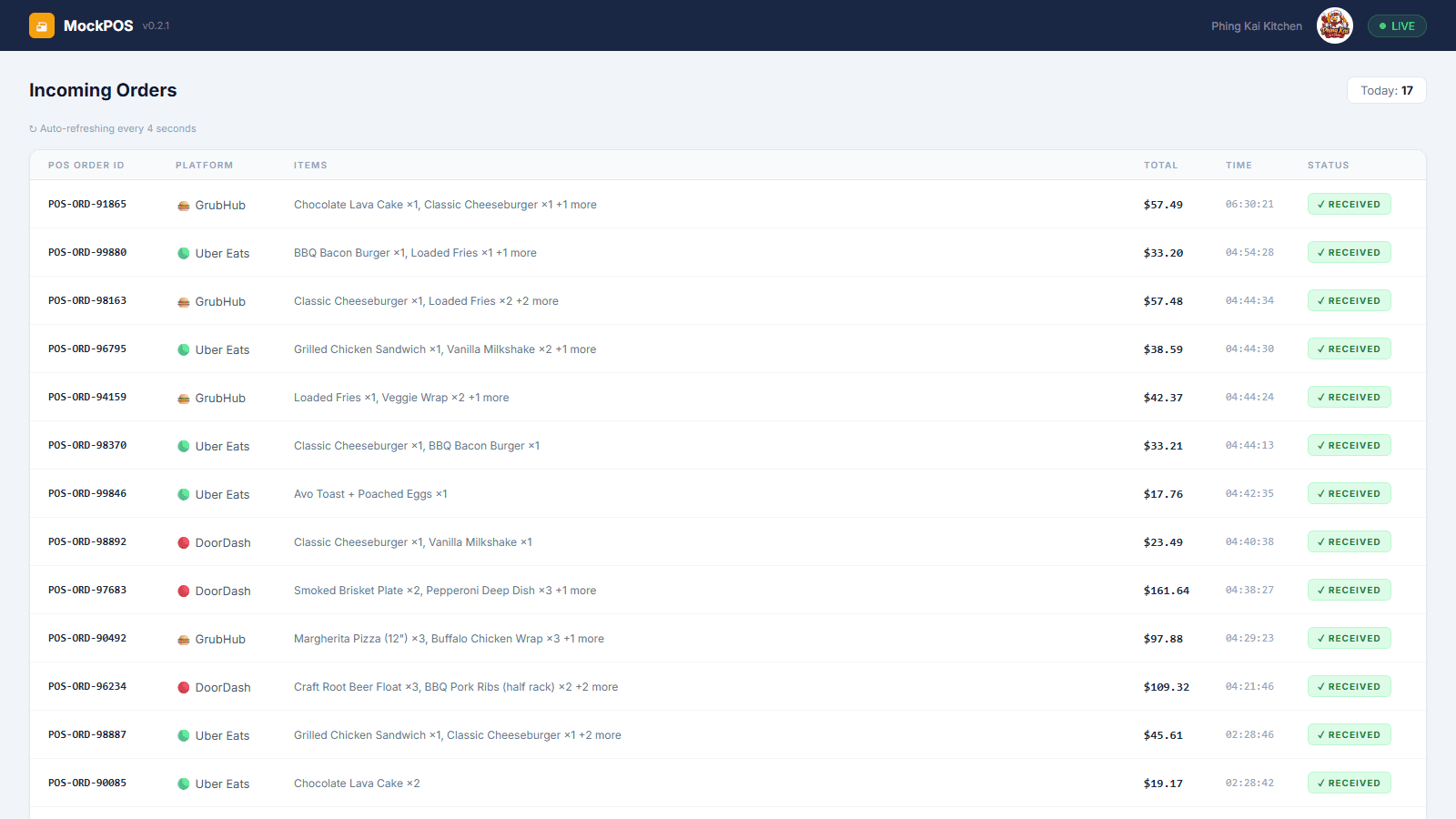
ລະບົບຈໍາລອງ POS ທີ່ເຮັດວຽກແຍກເປັນບໍລິການອິດສະຫຼະ - ມີລະບົບ OAuth consent ຂອງຕົນເອງ ແລະ ໜ້າຈໍຮັບອໍເດີຂອງຕົນເອງ.
ເປັນຫຍັງຕ້ອງແຍກບໍລິການ
ການແປງຂໍ້ມູນ ແລະ ຄວາມເຊື່ອໝັ້ນ
ລະບົບແປງຂໍ້ມູນ (Translator) ແມ່ນສ່ວນທີ່ຍາກທີ່ສຸດຂອງໂຄງການນີ້. DoorDash, Uber Eats, ແລະ GrabFood ລ້ວນແຕ່ມີວິທີທີ່ແຕກຕ່າງກັນໃນການອະທິບາຍ "Cheeseburger ບໍ່ໃສ່ຜັກດອງ." ການຈັບຄູ່ຂໍ້ມູນທີ່ບໍ່ສອດຄ່ອງເຫຼົ່ານີ້ໃຫ້ເປັນມາດຕະຖານ POS ດຽວກັນ ໃນຂະນະທີ່ຮັກສາຕາຕະລາງ MenuMapping ຕ້ອງໃຊ້ການຈັດການກໍລະນີພິເສດ (edge-case) ຢ່າງລະອຽດ. ຫາກການຈັບຄູ່ຜິດພາດ, ລະບົບຕ້ອງແຈ້ງເຕືອນ - ບໍ່ແມ່ນປ່ອຍໃຫ້ອໍເດີຫາຍໄປ.
ນອກຈາກນັ້ນຍັງມີ OAuth 2.0 Server. ມັນເປັນເລື່ອງໜຶ່ງທີ່ຈະໃຊ້ OAuth; ແຕ່ມັນເປັນອີກເລື່ອງໜຶ່ງທີ່ຈະເປັນຜູ້ໃຫ້ບໍລິການ (Provider). ການສ້າງ Authorization endpoints, ຕັກກະຂອງ token ແລະ ການເກັບຮັກສາທີ່ເຂົ້າລະຫັດຕາມມາດຕະຖານ RFC ຕ້ອງໃຊ້ຄວາມພະຍາຍາມຫຼາຍກວ່າສ່ວນອື່ນໆທັງໝົດລວມກັນ.
ຂໍແນະນໍາ OrderBridge
ຂ້ອຍມັກໂຄງສ້າງຂອງໂຄງການລູກຄ້ານີ້ຫຼາຍ ຈົນຂ້ອຍໄດ້ສ້າງ OrderBridge - ເປັນເວີຊັນທີ່ປັບປຸງໃໝ່ ແລະ ເປັນອິດສະຫຼະສໍາລັບພອດຟໍລິໂອຂອງຂ້ອຍ. ມັນບໍ່ແມ່ນພຽງແຕ່ການກັອບປີ້; ມັນຄືວິັດທະນາການ. ເປັນ Demo ແບບ End-to-end ທີ່ຈໍາລອງຂະບວນການທັງໝົດໂດຍບໍ່ຕ້ອງໃຊ້ໂຄງສ້າງພື້ນຖານໃນຊີວິດຈິງ.
ໂຄ້ດທັງໝົດຂອງລະບົບ
ທັງສາມສ່ວນປະກອບຫຼັກແມ່ນ Open-source ແລະ ມີໃຫ້ເບິ່ງໃນ GitHub:
ທົດລອງໃຊ້ງານ
ທັງສອງບໍລິການເປີດໃຫ້ທົດລອງໃຊ້ແລ້ວ:
ພ້ອມທີ່ຈະສໍາຫຼວດແລ້ວຫຼືຍັງ?
ເຈາະລຶກເບິ່ງ Source Code, ເບິ່ງລະບົບທີ່ເຮັດວຽກສົດໆ ຫຼື ເບິ່ງລາຍລະອຽດໂຄງການເຕັມ.